Don't Trust the Dashboard: How I QA My Own Software
A screen can render perfectly and still be lying to you. Three real bugs from Ofuma, and the habit that caught them: add the numbers up yourself.
By Dumebi ·
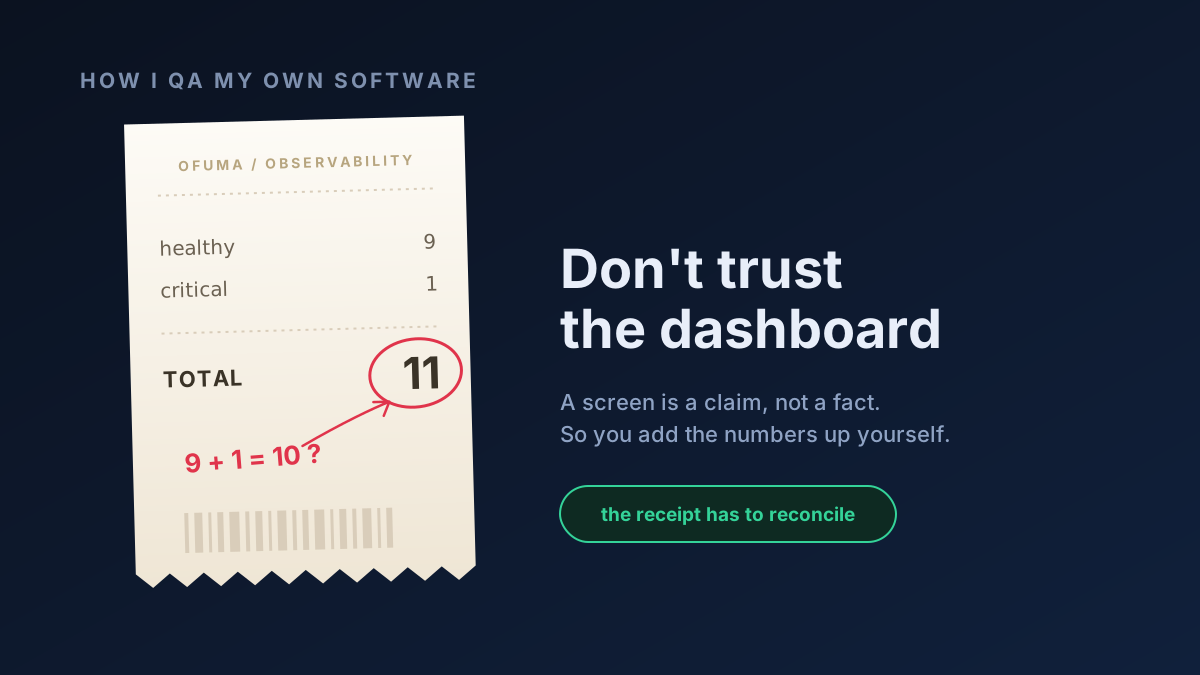
Imagine you are at the counter of a small shop. You buy a few things, and the cashier hands you a receipt. Usually at the bottom, in bold, is the total. Almost nobody reads the lines above it. We glance at the big number, say thank you (or any variation of that), and walk out.
But every so often somebody actually adds the line items up by hand, and the little sum in their head does not match the bold number at the bottom. The total is printed with confidence, but it is still wrong.
That gap, between "the screen says so" and "I checked it myself," is the whole of this article. Because a software dashboard is a receipt you never add up. It renders in a nice font, the colors are calm, nothing is on fire, and so we believe it. I want to walk you through why I stopped believing my own dashboards, and the plain, stubborn habit I use instead. Stay with me, there are three real bugs at the end and one of them is genuinely sneaky. 🙂
The screen is not the truth
Here is the thing it took me an embarrassingly long time in my career to feel in my bones: when a page loads without an error, you have proven exactly one thing, that the page loads without an error and that is all! You have not proven that the 82% on it is really 82%. You have not proven that the "3 active" is really 3. The number on the screen and the truth in the database are two different objects, connected by a chain of code that can quietly break anywhere along the way.
So, the question I now ask of every single number a screen shows me is not "does it look reasonable?" It is "can I get the raw rows out of the database, do the math myself, and land on the exact same number?" If I can, the number earns my trust. If I can't, I have either found a bug or found a hole in my own understanding, and both of those are worth the afternoon it costs to chase them down.
That is the mental model. Now let me make it real.
Bug one: the count that did not add up
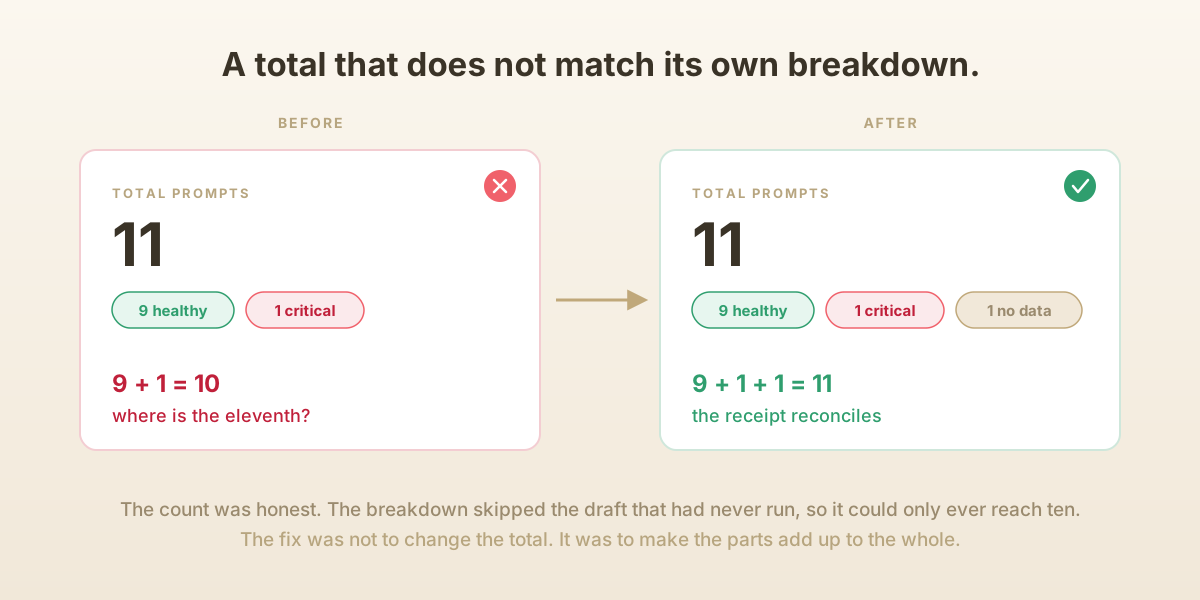
I was looking at the observability page of Ofuma, my LLM-operations platform. Right at the top it said I had 11 prompts. Directly underneath, it broke that down into little colored words: 9 healthy, 1 critical.
Add those up. Nine and one. That is ten. Where is the eleventh?
This is the shop receipt, live and in front of me. The bold total said 11 and the lines summed to 10. Now, I could have shrugged. It is one prompt, who cares. But a number that does not reconcile with its own breakdown is a loose thread, and loose threads are attached to things.
So, I went to the source of truth, the database, and counted the prompts myself. There were genuinely 11. The total was honest. Then I looked at what the health breakdown was built from, and there it was: the breakdown only counted prompts that had a real, deployable version. One of my prompts was a brand-new draft I had just created and never given a version to. The total counted it (it is a prompt, after all), but the health list quietly skipped it, because a thing that has never run has no health to report.
Both halves of the code were behaving sensibly on their own. The bug lived in the gap between them, where "11" sat above a breakdown that could only ever reach 10. The fix was not to change the count; the count was right. The fix was to make the parts add up to the whole: I added a third little word, 1 no data, for drafts that have nothing to report yet. Now the screen reads 9 healthy, 1 critical, 1 no data, and if you add those up like the careful shopper you are, you get 11. The receipt reconciles.
Driving the car, not reading the brochure
Here is a trap I have fallen into more than once, so let me warn you off it. It is very tempting to "test" a feature by opening its page, seeing that it renders, and moving on. That is reading the brochure (catalogue or flyer). The brochure has a lovely photo of the car. It tells you nothing about whether the engine runs smoothly.
To actually test software, you have to drive it. Not load the playground, actually type a prompt and run it against a real model. Not open the chain builder, actually drag the boxes, connect them, and press execute. Not glance at the evaluations page, actually start an evaluation, wait for it, and read the score off the screen while you separately compute what the score should be. Clicking the button is where the truth lives, because the button is the one thing a screenshot cannot fake.
I say this because the next bug only shows itself if you press the button, and the one after that only shows itself if you press a button that you are hoping will fail.
Bug two: the error that got swallowed
Ofuma lets you promote a version of a prompt into an environment for example staging or production and then roll it back if something goes wrong. I was walking a release all the way through its lifecycle: create it, run its checks, approve it, deploy it, and then, deliberately, try to roll it back when there was nothing to roll back to. I wanted to see the software fail. Testing the unhappy path is where most real bugs are hiding, because it is the path nobody demos.
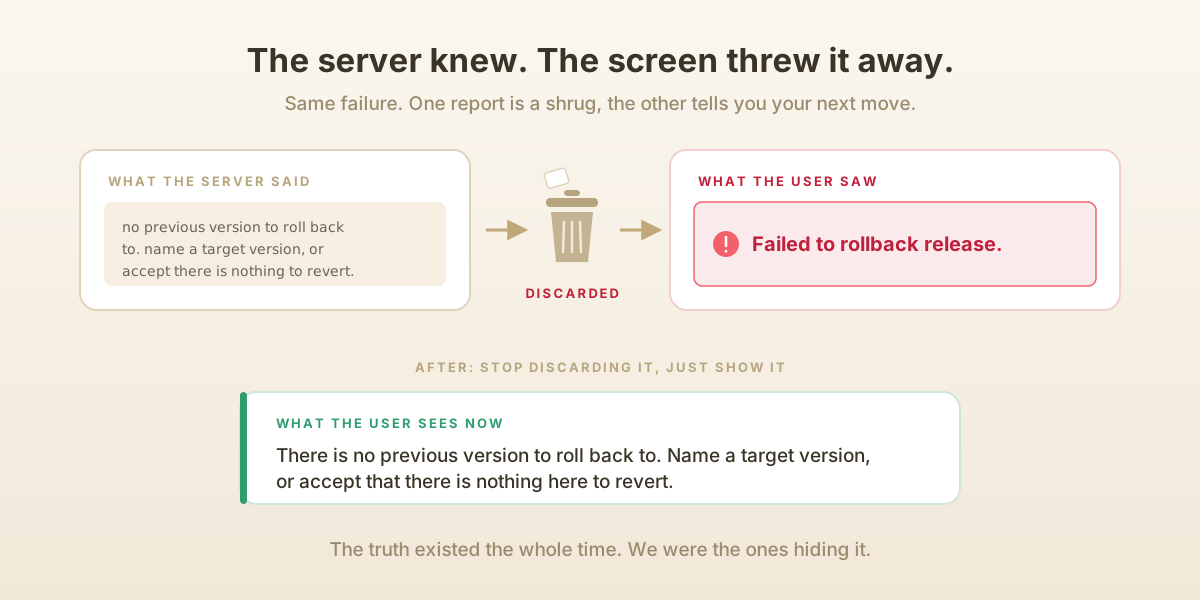
I pressed rollback, and the app told me: "Failed to rollback release." And, well, technically true! It did fail. But that message is useless. It is the software equivalent of a shrug. Why did it fail? Was it my fault? Is the system broken? Should I try again?
So, I went and read what the server actually said when it refused, and the server was not vague at all. Deep inside, it had thrown a clear, specific reason: there is no previous version to roll back to, so either name a target version or accept that there is nothing here to revert. The server knew exactly what was wrong. The problem was that the screen caught that precise explanation, threw it in the bin, and printed a generic "Failed to..." in its place. The truth existed and we were hiding it from the user.
The fix was almost embarrassingly small. Stop discarding the server's message and show it. Now when you try that same impossible rollback, the app tells you the actual reason in plain words. Same failure, honest report. A good error message is not a nicety; it is the difference between a user who is stuck and a user who knows their next move.
Bug three: the same box, two very different answers
This is my favorite, because it is the kind of bug you can only find by doing the boring thing twice.
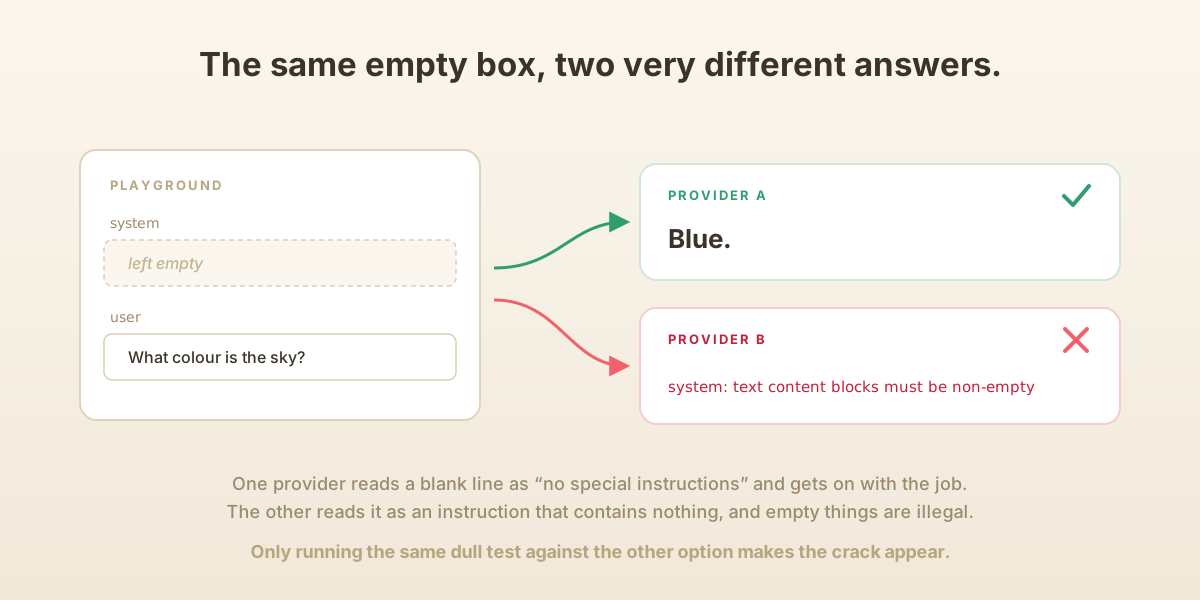
In the prompt playground you can set a "system" message (standing instructions for the model, like "always answer in one word", "answer in a calm tone" etc.) and a "user" message (the actual question). I typed a user question "Can you give me a color?", left the system box empty, picked one AI provider, and ran it. It answered "Blue." Perfect.
Then I did the exact same thing, empty system box and all, but switched to a different provider and instead of an answer I got a cryptic red error: "system: text content blocks must be non-empty."
Stop and sit with that for a second, because it is a lovely little lesson. Same input. Same empty box. Two completely different outcomes, purely because of who was on the other end. If I had only ever tested the first provider (which is exactly what a hurried person does), I would have shipped this and never known. It took running the same dull test a second time, against the other option, to make the crack appear.
The reason turned out to be a difference in manners between the two services. Think of the empty box like a blank line on a form. One provider reads a blank line as "this person left it empty, so there are no special instructions," and gets on with the job. The other provider reads a blank line as "this person handed me an instruction, and the instruction is... nothing," and it recoils, because an instruction that contains nothing is not a valid instruction. One sees an empty box as "nothing." The other sees it as "an empty thing," and empty things are illegal. 😅
My own code was the one handing that empty thing over. When the system box was blank, I was still dutifully packing up an empty instruction and mailing it off, and the stricter provider was right to reject it. The fix was to notice when the box is truly empty and, in that case, send nothing at all, no instruction, not even an empty one. Which, funnily enough, is exactly what the friendlier provider had been quietly doing for me the whole time. After the fix, the strict provider answered "Blue" too. And to be sure I had not broken the good case, I put a real instruction back in the box, ran it, and watched the answer obey it. Both paths now working correctly.
Keep going until a whole round finds nothing
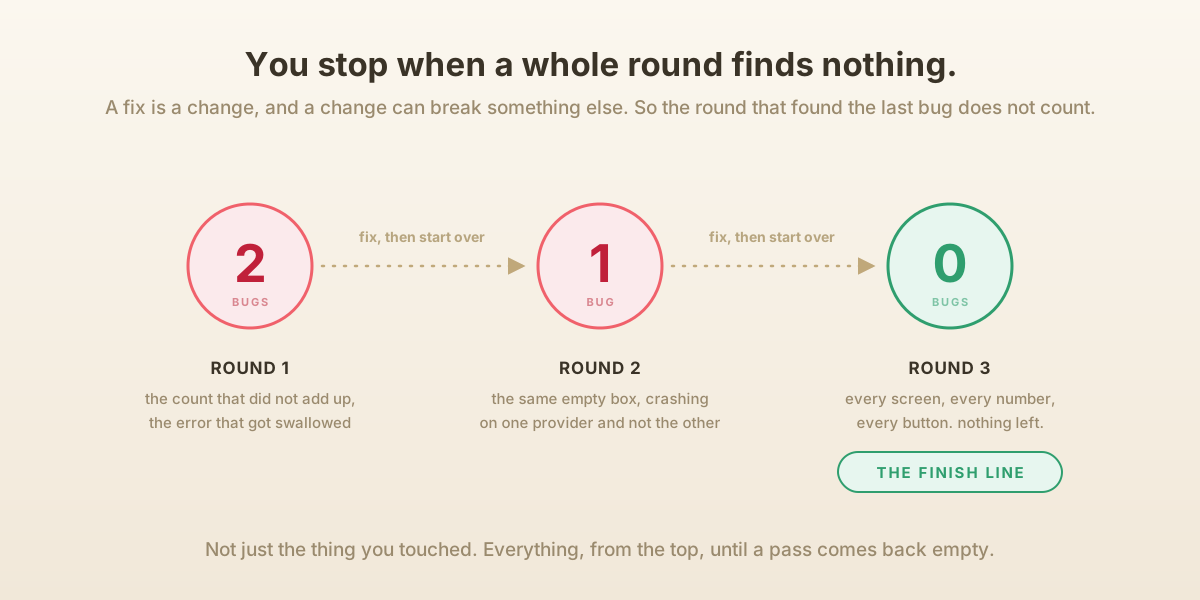
Now here is the part that turns a lucky bug hunt into a discipline. When I find and fix a bug, I do not get to declare victory. A fix is a change, and a change can break something else. So, the rule I hold myself to which I have picked up from work is this: after any fix, I start the whole round over and test everything again, from the top. Not just the thing I touched. Everything.
You stop only when one complete test round with every screen, every number checked against the database, every button actually pressed, finds nothing at all. That empty round is the finish line. The round before it, the one where you fixed the last bug, does not count, because you have not yet proven the fix is clean.
On this particular sweep of Ofuma that meant several rounds. One round found two bugs (the count and the swallowed error). Fixing those forced another full round, and that round found the sneaky cross-provider one. Fixing that forced yet another round to prove the fix had not disturbed anything. Only when a round finally came up empty did I let myself say it was done.
It sounds exhausting, and honestly it sort of is, but there is a real payoff. It is the difference between "I fixed the bug I saw" and "I have driven every path and, right now, I cannot find another." Only one of those lets you sleep.
I have started writing this habit down as a repeatable checklist for my AI coding assistant to follow, a little skill it can run on command: map how every number is computed, drive the live app, add up each value against the database by hand, exercise the empty and broken states on purpose, fix, then loop until a round is clean. In fact, this whole sweep of Ofuma was done by an AI driving a real Chrome browser, clicking the buttons and checking the numbers, and that turned out to be a whole story of its own, which I tell over here: The Robot at the Keyboard.
The real idea
Strip away the receipts and the empty boxes and the rollbacks, and what is left is a small, slightly grumpy conviction: a screen is a claim, not a fact. Software will tell you it is fine in a calm font with soothing colors, and most of the time it even means it. But "most of the time" is not a plan, it is a hope. So, you add the numbers up yourself. You press the button that is supposed to fail. You run the same boring test against the other option. And you keep going until a whole pass comes back empty.
It is slow, and it catches the one thing in a thousand that would have embarrassed you in front of a real user. And that one in a thousand, my friend, is exactly the point. 🙂
Prove all things; hold fast that which is good. - 1 Thessalonians 5:21