How I Got My Invisible Website onto Google
My site was live, but Google found nothing. Its robot saw a blank page where I saw a full article. The three moves that finally got my site found by google.
By Dumebi ·
Start with a library and a scout
Imagine you wrote a book. A good one! You are proud of it, so you put it on a shelf in your house, and then you wait for the world to read it. And you wait. And nobody comes, because nobody actually knows the book exists.
That was my website for a while. It was live, it was working, it was full of articles I had genuinely sat down and written. And it was completely invisible to Google. If I searched for one of my own articles by its exact title, Google shrugged and returned nothing. As far as the world's biggest library was concerned, the site was not there at all.
So let me start where the confusion starts, with a library.
The world's libraries solved "how do I find one book among millions" a long time ago, with a card catalog. You do not wander the shelves hoping to bump into what you want. You look it up in the catalog, and the catalog tells you exactly where the book lives. The catalog is the whole reason a library is usable instead of a warehouse.
Google is that catalog, for the internet. Here is the part people miss: when you search Google, you are not searching the live internet. You are searching Google's own card catalog (its proper name is the index) of pages it visited earlier and filed away. If a page is not in that catalog, searching will never surface it, no matter how good the page is.
The card catalog is the whole game
So how do pages get into the catalog? Google sends out little automated scouts. They are politely called crawlers, or sometimes spiders 🕷️. A scout visits your page, reads it, and writes a catalog card: this page is about such and such, here is its title, here are its words. That card is what people later find when they search.
Hold onto this, because it is the entire story: no card in the catalog means no one can look you up. And a scout can only write a card if, when it visits, it can actually read the page. Keep your eye on that word "read." It is where everything went wrong for me.
My problem: a book written in invisible ink
My website is built as something called a single page application (SPA). It just means that when your browser asks for one of my pages, the server does not send back a finished, printed page. It sends back a nearly empty page plus a bundle of JavaScript, and your browser then runs that JavaScript to build the real content right there on the spot. It is a bit like receiving a flat pack from Ikea: what arrives in the box is not a table, it is the parts and an instruction sheet, and the assembly happens in your living room.
For a human this is lovely. The site feels fast and smooth and app-like once it snaps together. This was a deliberate choice, not a mistake.
But now picture the scout arriving. It knocks, asks for the page, and gets handed the flat pack: the nearly empty page and a pile of instructions. The real words of my article are technically in there somewhere but written in a kind of invisible ink that only appears when a genuine browser holds the page under its lamp (that is, actually runs the JavaScript). And here is the catch: the scout does not always carry the lamp. Google's scout sometimes does, but slowly and unreliably, and a whole crowd of other scouts (the ones that build the little link previews on WhatsApp, Slack, LinkedIn) never do at all. So, the scout opens my book, sees blank pages, shrugs, and files nothing.
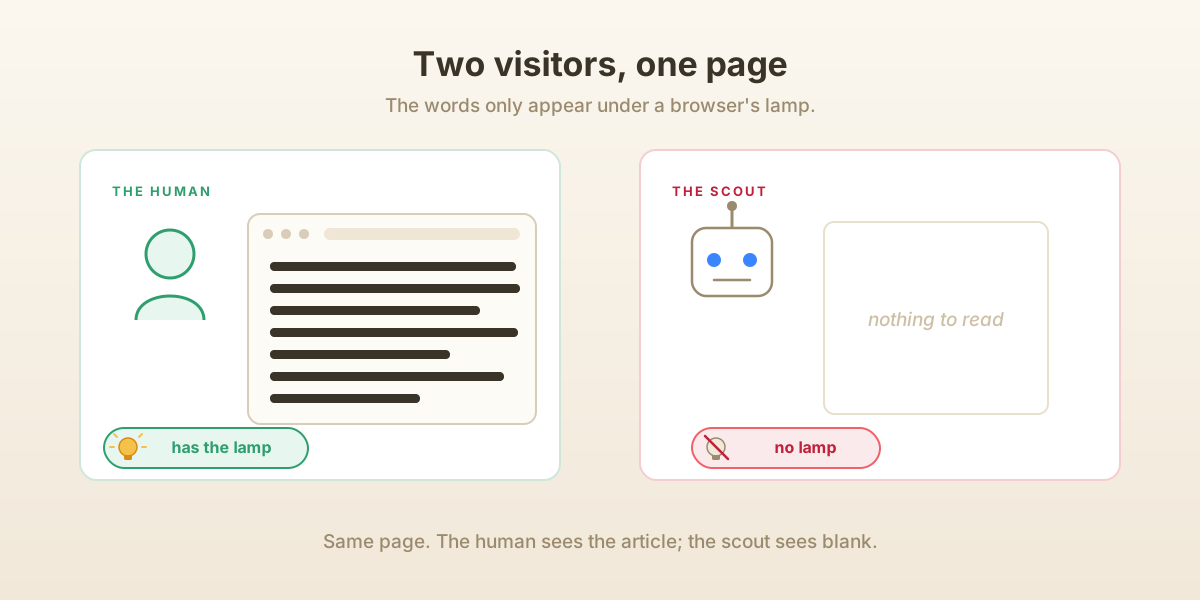
That was the whole problem. My site was not banned or punished by Google. It was just blank at the one moment it was being read.
The business card that was already there
I actually already had a patch in place, and understanding why it did not help is half the lesson.
You know when you paste a link into WhatsApp and a neat little preview pops up with a title and a picture? That preview is fetched by one of those no-lamp scouts. Months earlier I had set up a trick just for them: my server watches for scout visitors (it recognizes them by the name each one announces when it knocks, a thing called the user agent), and for those visitors it quietly hands over a tiny hand-written page carrying just the title, a short description, and the cover image. Enough to paint a pretty preview card.
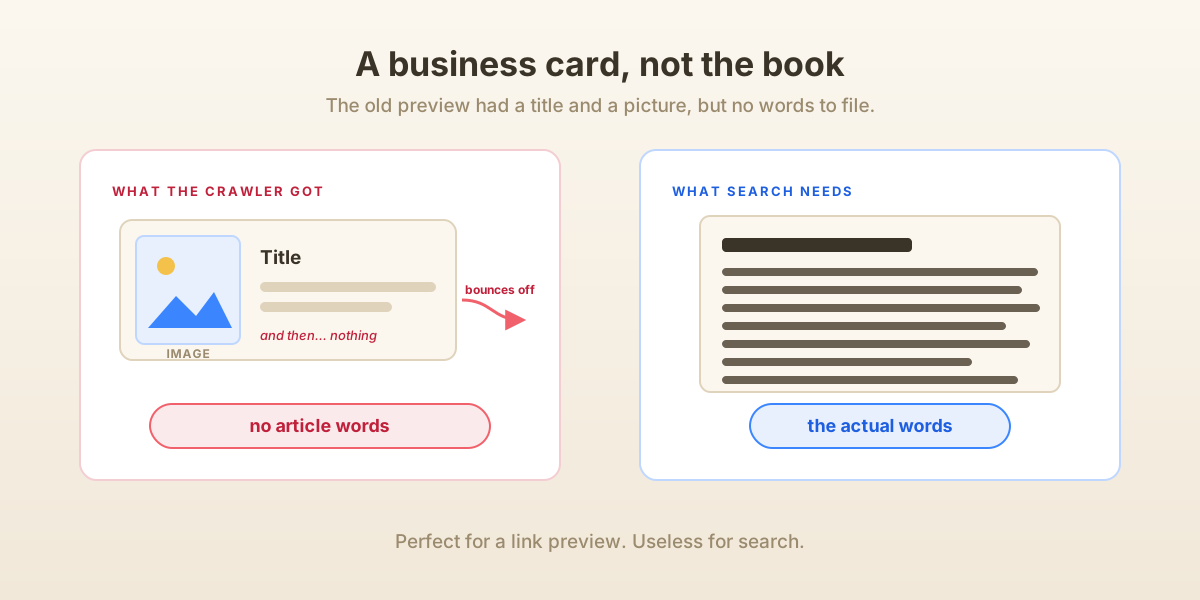
But look closely at what that page was. It had a title and a picture, and then it immediately bounced the visitor onward to the real site. It was a business card, not the book. Perfect for a preview, useless for search, because there were no actual article words on it to file. And even Google's scout, which was on my list, got handed the same business card and the same bounce. It still walked away with nothing real to catalog. I had lovingly built the preview and completely forgotten the entire point of search: the words.
The fix: hand the scout a copy it can actually read
Once you see the problem clearly, the fix almost writes itself. If the scout cannot read invisible ink, then stop handing it invisible ink. Hand it a plain, fully printed copy.
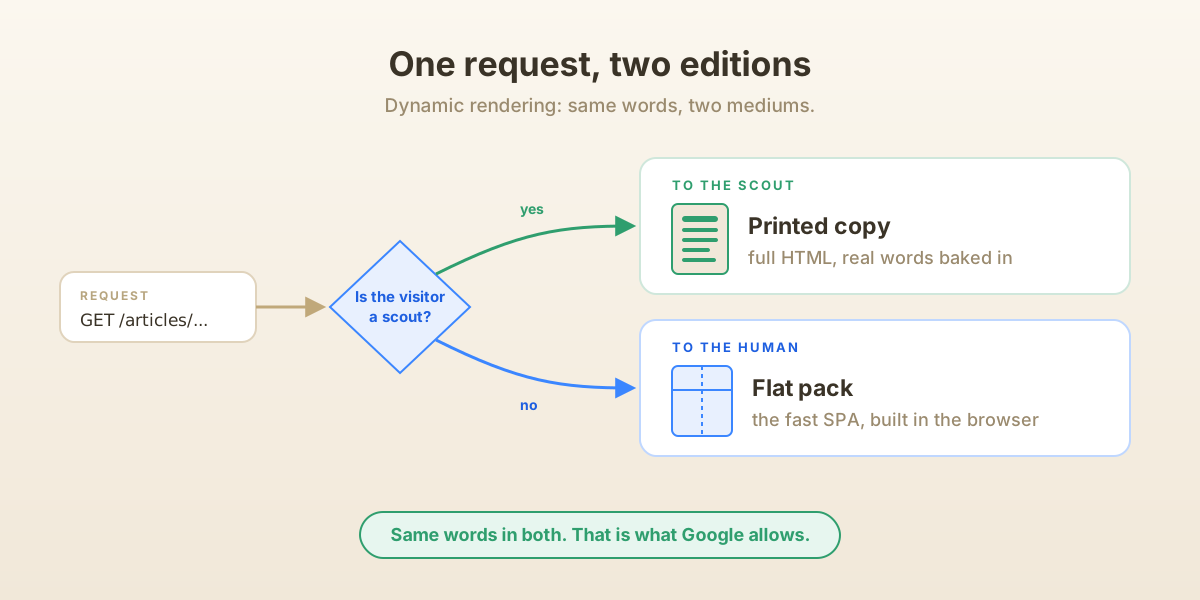
I taught my server to do, for every article and every project, what it was already half-doing for previews, but properly this time. When a scout now asks for an article, the server builds the whole thing on its own side: the real headline, the author, the date, and above all the full body text of the article, and sends that back as ordinary, already-visible HTML. No lamp required, the words are just there. Meanwhile a normal human visitor still gets the fast flat-pack version exactly as before.
One lucky break made this much easier than it could have been. I already store the body of every article as plain HTML (that is simply what my editor produces when I write). So "print a readable copy" was mostly a matter of wrapping the HTML I already had with a proper head and handing it over. Had I stored my articles in some private, browser-only format, this would have been a much longer story.
Now, a fair and slightly nervous question: is this cheating? Showing the scout one thing and humans another sounds dodgy, and Google genuinely does have a rule against it. It is called cloaking, and it means showing the robot a page about puppies while showing humans a page about payday loans. But the line is refreshingly simple: the content has to match. My printed copy and my flat-pack copy say the exact same words. They are just delivered in two different mediums, printed versus self-assembling. Google not only allows this, but it also has a name for it, dynamic rendering. Same book, one edition in plain ink for the scout, one in the fancy invisible ink for people who arrive with a browser.
I did the same for my project pages. And I gave the home page its own printed version too: a short introduction plus links to my latest articles and projects, so that a scout landing on the front door immediately sees a trail leading to everything else in the building.
A quick word on the catalog card
While I had the printer running, I slipped one more thing onto each printed page: a neat, machine-readable summary card. Tucked in beside the human-readable article is a small block of what is formally called structured data (its technical name is JSON-LD, where LD stands for "linked data"). It spells out, in exactly the format a scout loves, "this is a blog post, the headline is this, the author is DMB, it was published on this date, here is the cover image."
Think of it as clipping a perfectly filled-out catalog card to the front of the book, so the librarian does not have to squint and guess what the book is about. This little card is the stuff that lets your search result show up looking rich, with the proper title, author, and date, instead of a bare blue link.
A table of contents for the whole library
A scout can wander from link to link and eventually stumble onto everything. But why make it wander? A good library hands you a table of contents. So, I built one for the entire site, and it has a standard name: a sitemap.
A sitemap is just a plain list, in a format search engines already expect, of every address on your site worth visiting: every published article, every project, and the main pages. I very much did not want to hand-maintain this list, because it would be wrong the instant I published anything new. So I made it write itself. When Google asks for my sitemap, my server queries the database right at that moment and builds the list fresh. Publish a new article at noon, and the sitemap includes it at 12:00 and one second. No scheduled job to run overnight, no stale file sitting around, nothing for me to remember.
A note taped to the door
There is one last small courtesy every website pays to these scouts: a little note taped to the front door, called robots.txt. It is the very first thing a polite scout reads when it arrives. Mine says three quiet things. You are welcome to read everything. Please do not bother with the admin pages (there is nothing there for the public, and no sense advertising the staff room). And, by the way, the table of contents is right over here, at this exact address. That last line is how a scout that has never even heard of me can still find my full list of pages the moment it walks in.
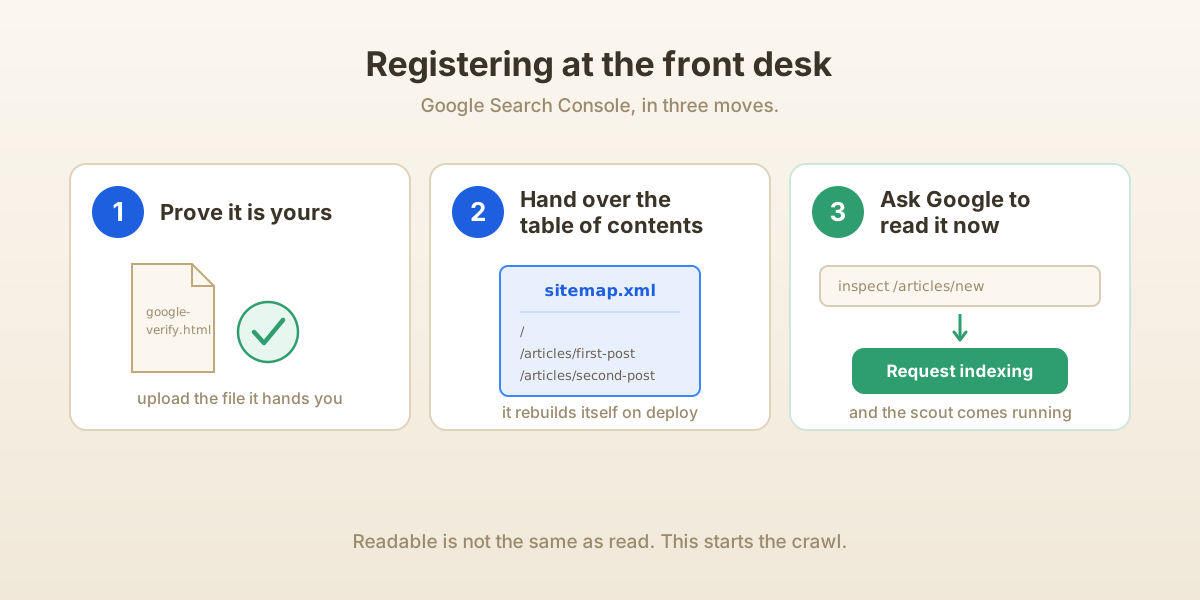
Registering at the front desk
Here is the thing though. Everything so far makes the site readable. Readable is not the same as read. I could have sat back and waited for a scout to wander past on its own, which does eventually happen, but there is a much faster option: a front desk where you walk up and simply register your book. It is called Google Search Console, it is free, and it is the step that actually gets the ball rolling.
There are three moves.
First, you tell Google, "This site is mine." Google, sensibly, wants proof you are the real owner and not some stranger claiming my domain, so it hands you a uniquely named file and says, "put this on your site." Only the true owner could place a file there. So, I dropped the file in, Google fetched it, saw its own secret code staring back, and believed me. (You can also prove ownership through your domain's DNS settings, but the file was quicker.)
Second, you hand over the table of contents. You paste in the sitemap's address, and now Google holds the full list of everything on the site worth filing, without having to discover it piece by piece.
Third, and this is the genuinely satisfying part, for your most important pages you do not have to wait at all. There is an "inspect this URL" box with a button next to it that essentially says, "please go read this one now." I pointed it at a handful of my best articles and asked Google to read them immediately. Within a day, searching for those titles finally turned up my own site. The book was, at long last, in the catalog. 🙂
What it all cost
Almost nothing: a bit of code and one small verification file. No new service, no monthly bill, no rebuild of the site. The whole thing was really just taking each piece I already had (a site that renders in the browser, article bodies already stored as HTML, an old preview trick for scouts) and finally pointing them at the one job I had skipped: being readable at the exact moment a scout comes to read.
Which brings us back to the book on the shelf. A website that is live is simply not the same thing as a website that can be found, in the same way that a finished book sitting in your house is not the same as a book listed in the library catalog. Being online is you writing the book. Being on Google is the world being handed a card that tells them where you are. Two different jobs, and for months I had quietly done only the first one.
So, if you run a fancy JavaScript site and you are scratching your head about why Google cannot seem to see it, this is almost always the reason. Your words are written in invisible ink, and the scout showed up without a lamp. Hand it a printed copy, leave a table of contents at the door, and go register at the front desk. Then go and search your own article and enjoy it. 😄
You are the light of the world. A city that is set on a hill cannot be hidden. - Matthew 5:14