Cut at the Quarry
How my apps are built in CI and only ever assembled on the server
By Daniel Chiwuzoh ·
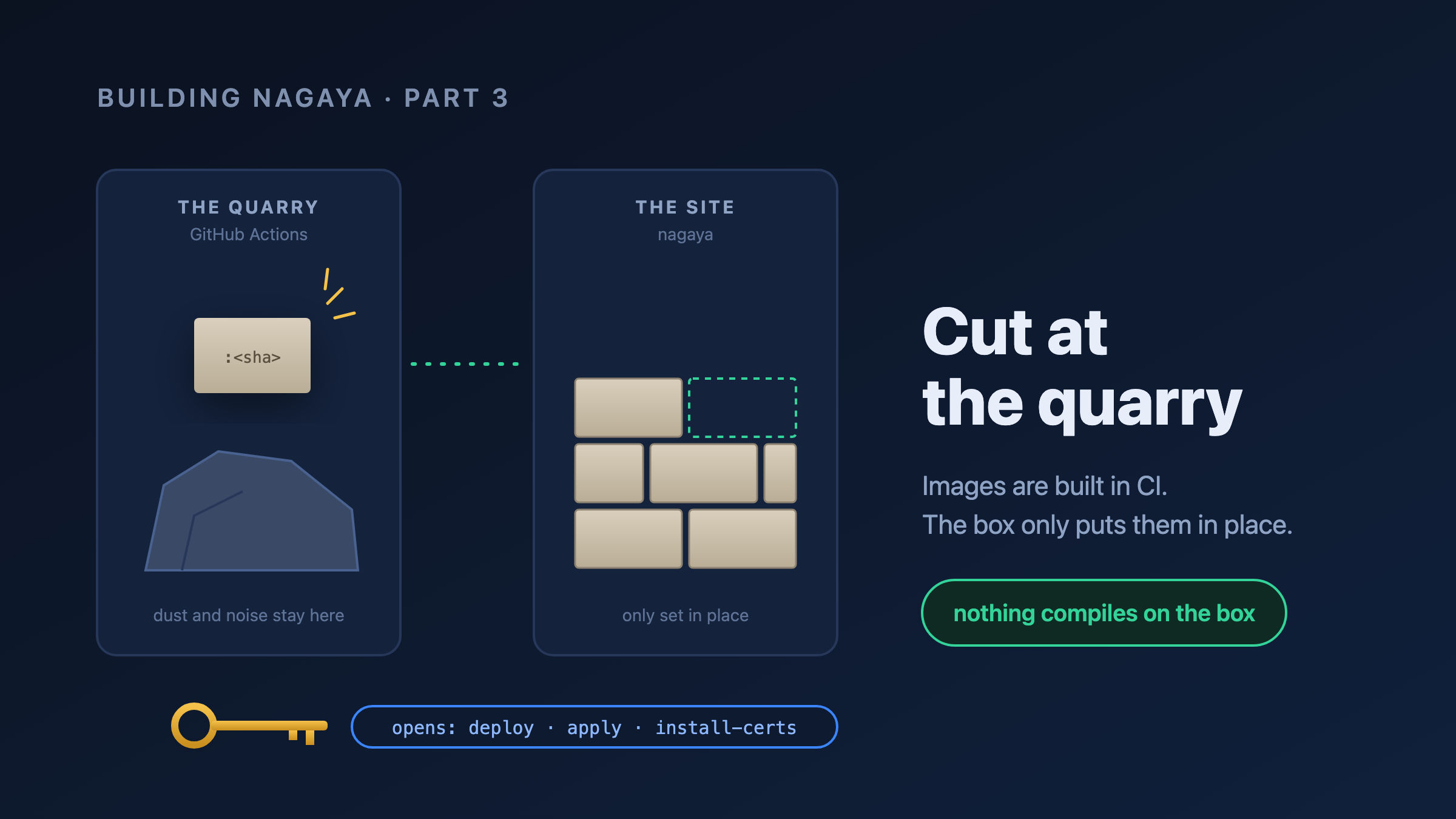
There is a small detail in the story of Solomon's temple that I have always liked. The stones were not shaped on the building site. They were cut and dressed at the quarry, every one of them made ready before it was carried up the hill. So while the temple went up, the site was quiet. No hammer, no axe, no iron tool was heard in the house while it was being built. The builders on site only did one thing: they put finished stones in their places.
Think about what that buys you. The dust, the noise, the broken stone and the heavy tools all stay at the quarry. The site stays clean, and the people working there need far less room and far fewer tools.
Now a second picture. Imagine a courier who delivers to a block of flats. You don't give him the master key to the building. You give him a key to the parcel locker by the door, which opens that one locker and nothing else. If he loses it, the worst anyone can do with it is put a parcel in a locker.
This article is about both: where my apps are cut, and the key that lets them be delivered.
My server is called nagaya (長屋, a row house: many households under one roof). It is one small rented computer that runs all my futari.live and ofuma.ai sites. In One Drawing for the Whole Building (part 2) I showed how one file, sites.yaml, says what runs on it. Now for how a change to an app actually gets there.
When the hammering happened on site
First, a quick word on what is being built. An app runs on my server inside a container: a sealed bundle of the program plus everything it needs. The recipe for that bundle is a Dockerfile, and following the recipe produces an image, a frozen copy of the finished bundle. Building an image means installing dependencies, compiling TypeScript, bundling a frontend. That's the stone cutting. It is slow, it is noisy, and it is hungry for memory.
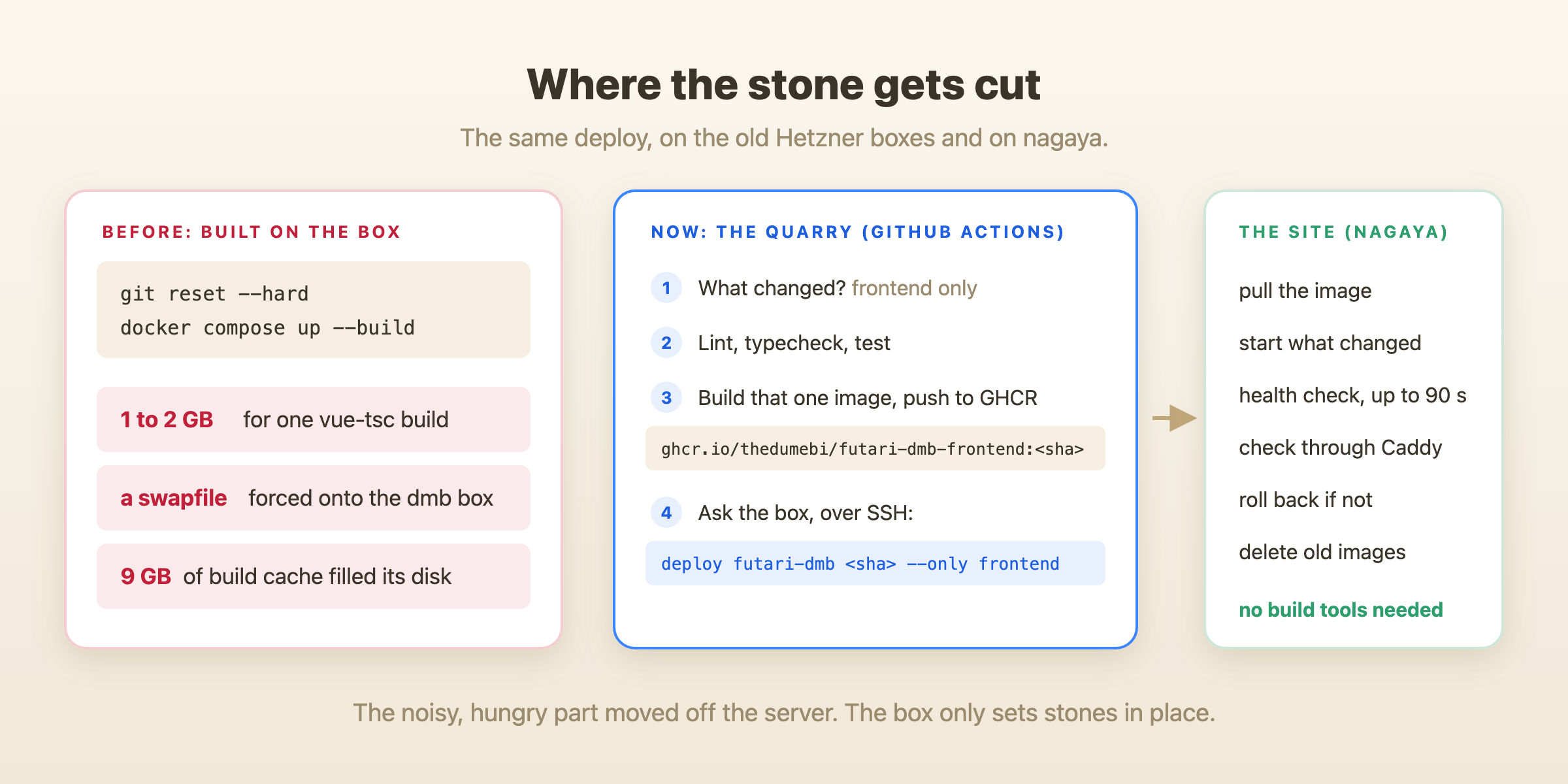
On my old Hetzner boxes, every deploy did the cutting on site. A deploy SSHed into the box, ran git reset --hard to bring the code up to date, and then docker compose up --build, which built the images right there on the server that was also busy serving my visitors.
That had a cost. A vue-tsc build (the type check for a Vue frontend) on the box can take 1 to 2 GB of memory, on a box with 4 GB in total. Building on the box is what forced a swapfile onto the box, and it once filled that box's disk with 9 GB of build cache. Imagine the stonemasons leaving their chippings on the temple floor after every single stone.
So on nagaya there's one thing I deliberately never do: build images on the box.
The quarry is GitHub Actions
On nagaya the cutting happens somewhere else entirely. Each app's repo has a workflow on GitHub Actions, GitHub's service that runs a script on one of its computers every time you push. That script is CI (continuous integration), and it is my quarry.
When I push to an app, its workflow:
works out which parts of the app the push changed (more on this below);
runs the tests;
builds an image for each changed part;
pushes the image to GHCR, GitHub's container registry, which is basically a warehouse for images;
asks the box to deploy it.
Every image has a predictable name and is labelled with the version of the code it was built from:
ghcr.io/thedumebi/<app>-<site>-<service>:<sha>
ghcr.io/thedumebi/futari-dmb-backend:<sha>
The <sha> is the ID git gives every saved version of the code, a long string of letters and numbers. Labelling images with it means I always know exactly which code a running container came from, and "deploy version X" is a sentence with only one possible meaning.
The box itself only ever pulls finished stones out of the warehouse. It has no build tools to speak of, no build cache to fill, and none of the 1 to 2 GB spikes. It even clears out after itself: after every successful deploy nagaya deletes the images no project is running any more. Older versions are not kept on the box. If I ever need to roll back, it pulls the old version straight back from GHCR, which takes a few seconds. And just in case, it clears any build cache too, even though nothing is ever built on this box.
Secrets travel inside the stone
An app needs settings and secrets: the database password, API keys and so on. On the old boxes each backend read them from a file in the repo checkout on the server. On nagaya there is no checkout, because the box only pulls images, so the settings have to travel inside the image. Each app keeps its .env.production file encrypted with dotenvx, kept in its own repo, and the Dockerfile copies that encrypted file into the image. Every value in it is scrambled, and the key that unscrambles it is never in the image. The keys live only on my laptop and on the box, and nagaya hands each container only the key for its own environment, so a staging container never even sees the production key. Someone who steals an image gets a locked box with no key.
The courier's key
So CI has built the stones and put them in the warehouse. Now it needs to tell the box: "please deploy version X of dmb". It does that over SSH, the standard way to log into a server remotely and run a command. SSH logs you in with a key pair: a private key that you keep, and a public key that you put on the server in a file called authorized_keys, which is the server's list of keys it will let in.
The problem is that a normal SSH key is a master key. Whoever holds it can log in and run anything at all. And this key has to sit in the CI secrets of five repos (nagaya itself, plus dmb, abm, nihongo and ofuma.ai). Five copies of a master key is five chances to lose one.
So the key's line in authorized_keys comes with conditions attached:
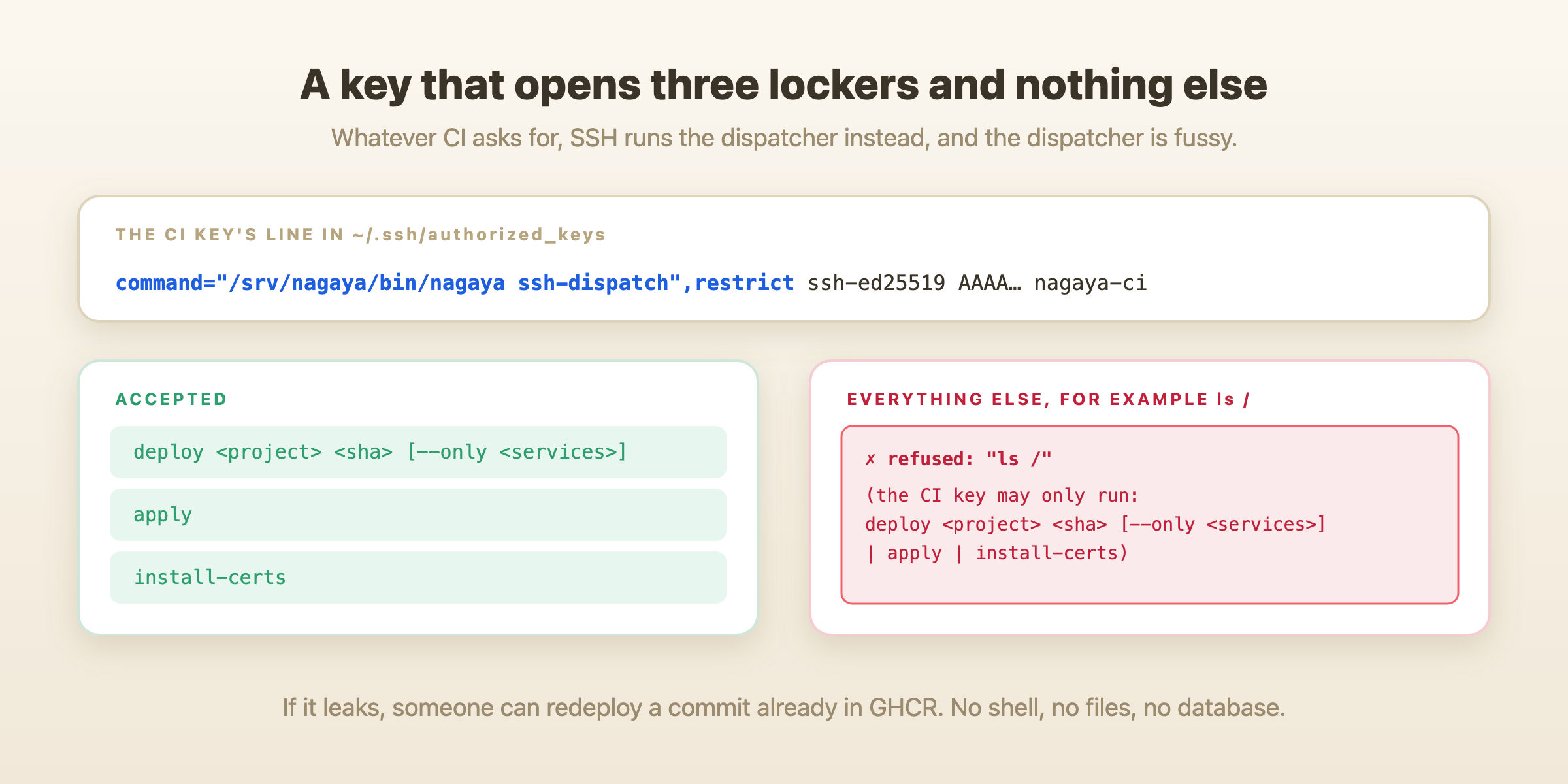
command="/srv/nagaya/bin/nagaya ssh-dispatch",restrict ssh-ed25519 AAAA… nagaya-cicommand= is a feature of SSH called a forced command. Whatever the person holding this key asks to run, SSH ignores it and runs nagaya ssh-dispatch instead, passing along what was asked for so the dispatcher can read it. restrict switches off everything else SSH might allow: no port forwarding, no agent forwarding, no terminal. That is the courier's locker key.
And ssh-dispatch is very fussy about what it accepts. It is a small function in the nagaya script that checks the request against exactly three patterns:
deploy <project> <sha>, optionally with--only <services>;apply, which makes the box matchsites.yaml;install-certs, which installs the origin certificates Terraform holds (that one has a whole story in The Revoked Certificate (part 11)).
Anything else is refused. You can prove it by trying to list the server's files with the CI key:
$ ssh -i ~/.ssh/nagaya_ci deploy@<the box's address> 'ls /'
✗ refused: "ls /" (the CI key may only run: deploy <project> <sha> [--only <services>] | apply | install-certs)
So if that key ever leaks, the worst someone can do is redeploy a version that is already in GHCR, run apply, or install a certificate issued for the private key already on the box (which they can't get without my Cloudflare account). They can't read a file, open a shell or touch a database.
Two more small things keep the key honest. When I first copied it onto the box, I appended that line by hand rather than using ssh-copy-id, because ssh-copy-id would have added the key without the restriction. And CI pins the box's own identity, its host key, so CI will only ever hand its request to the real box and not to something pretending to be it. Terraform puts the box's address and host key into each repo's secrets, but never the SSH key itself, because anything Terraform sets is stored in its state file, and that is one more place a key could leak from.
What the box does with a deploy
When nagaya deploy futari-dmb <sha> arrives, the box does the on-site work, which is just putting stones in place:
Prepare. Make sure the site's network exists and Postgres and Redis are plugged into it, pull the new images from GHCR, and read the database credentials out of the image's encrypted env file to create or update the site's database role.
Start.
docker compose up, which recreates only the containers whose image changed.Check. Ask each service's health check from inside its container, every 2 seconds for up to 90 seconds. Then request each of the site's addresses through Caddy, the web server at the front of the box, to prove the whole path works.
Roll back if any of that fails: print the last 40 lines of each container's logs, put the previous versions back, and fail the job so the workflow goes red.
Only one nagaya command runs at a time. Each one takes a lock first, so a deploy from CI and an apply from a merge can never interleave. If the lock is busy, the next command waits up to 15 minutes for it. That lock comes back later in the story.
A deploy is a blip of a few seconds per site while a container is replaced. That is a choice, not an oversight: zero-downtime deploys are something I deliberately don't do, because these sites can take a few seconds' blip.
One stone at a time
My apps mostly come in pairs: a backend and a frontend. At first, a deploy replaced the whole site. Each project had one image tag, so a one-line change to the frontend also pulled and restarted the backend, and the backend's start command runs its database migrations (and, for the futari apps, a seed) before it starts serving. Restarting the backend for a frontend tweak is cutting a new foundation stone because you changed a window.
So I gave every service its own tag. The box keeps a small file per project that records what each service is running:
TAG_BACKEND=<sha of the last backend deploy>
TAG_FRONTEND=<sha of the last frontend deploy>
and each compose file reads its own variable, ${TAG_FRONTEND} for the frontend and ${TAG_BACKEND} for the backend. A deploy with --only frontend changes one line in that file, and Compose leaves the backend's container completely alone. nagaya status shows each one, something like backend 447cf59 · frontend 9a1c2d3, and a rollback restores the whole previous set.
Then I taught the workflows to use it. Each one now starts with a job called "What changed", which compares the push with the version before it. A change under dmb/frontend/ touches the frontend. A change to shared code, the lockfile or the workflow itself counts for every service. Then it tests, builds only the images that changed, and sends:
deploy futari-dmb <sha> --only frontendA manual run, a brand new branch or a force-push deploys everything, because there is no reliable "before" to compare with.
The half hour that followed
Per-service deploys shook three things loose, and I fixed all three within about half an hour. Here is each one.
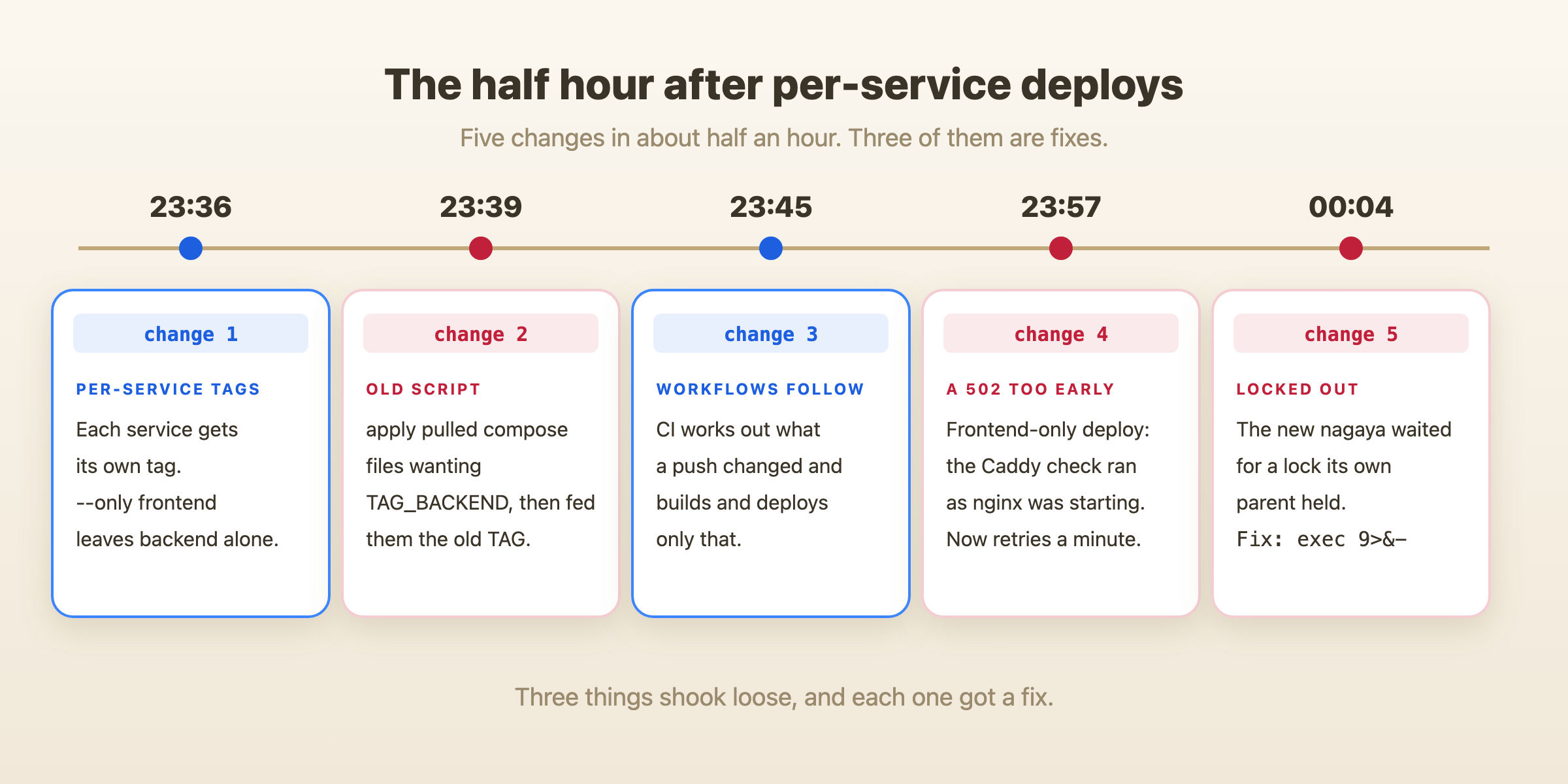
The script that read yesterday's instructions
When I merge to the nagaya repo, CI runs nagaya apply on the box, and the first thing apply does is git pull to fetch the newest version of the repo. Including, of course, the newest version of the nagaya script itself.
But the script doing the pulling was the old one, already running in memory. So CI ran the old script, which pulled compose files that need per-service tags and then fed them the old single TAG. The new compose files wanted TAG_BACKEND and TAG_FRONTEND. The old code only knew about TAG. It's like a foreman who picks up the new drawings at the start of the day and then carries on building from the ones in his head.
The fix is for apply to notice when the pull changed it, and hand over to the new version:
local script_before; script_before="$(sha256sum "$ROOT/bin/nagaya")"
info "git pull"; git -C "$ROOT" pull --ff-only --quiet
if [[ "$(sha256sum "$ROOT/bin/nagaya")" != "$script_before" ]]; then
  info "nagaya itself changed; continuing with the new version"
  NAGAYA_SECRETS_LOADED='' exec "$ROOT/bin/nagaya" apply --no-pull
fi
It takes a fingerprint of itself before the pull and another after. If they differ, exec replaces the running script with the new one, which carries on with --no-pull so it doesn't pull again. The empty NAGAYA_SECRETS_LOADED makes the new version load nagaya's own secrets again too, in case those changed in the same pull.
The lock it held against itself
That fix brought its own surprise, and it is my favourite of the three. Remember the lock? Apply takes it before it does anything. Then it hands over to the new version of itself, and the new version, like every nagaya command, wants the lock too.
nagaya loads its secrets by restarting itself under dotenvx, which decrypts them and passes them in. Here's the trap: the restart went through dotenvx, which kept hold of the lock it inherited, so the new nagaya waited for a lock its own parent held.
It's like locking the bathroom door, climbing out of the window, and then queueing outside the door waiting for whoever is inside to finish. It's you. You are the one inside. Left alone it would have waited up to 15 minutes and then given up.
The fix is one line before the hand-over, which closes the lock's file and so lets the lock go:
exec 9>&-The frontend that wasn't up yet
The third one only appears with per-service deploys. After starting containers, the deploy requests each of the site's addresses through Caddy. Any answer below 500 proves Caddy, the certificate and the container behind it are all wired up (an API may well answer 404 on /, and that is fine). A 502 means Caddy has nothing to hand the request to yet.
Backends have a health check, so the deploy waits for them before this step. Frontends don't have one of their own. So on a frontend-only deploy there was nothing to wait for, and the check through Caddy ran while nginx was still starting and saw a 502. The site was fine a moment later. The deploy had just looked too early and failed a good release.
Now the check tries each address up to 30 times, 2 seconds apart, for about a minute, and only fails if it never gets an answer below 500.
Back at the quarry
Put it together and a change to one of my apps goes like this. I push. GitHub's computer works out what changed, tests it, cuts only those stones and puts them in the warehouse labelled with the version. Then it uses a key that opens exactly one locker to say "deploy this". The box pulls the stones, sets them in place, checks they hold, and puts the old ones back if they don't. Nothing is compiled on the server, and the key in five repos' secrets can't do anything else.
Next in the series, The Gatehouse (part 4) covers the other door into the box, the one visitors use, and how Cloudflare stands in front of it. I hope this was helpful 🙂.
And the house, when it was in building, was built of stone made ready before it was brought thither: so that there was neither hammer nor axe nor any tool of iron heard in the house, while it was in building. - 1 Kings 6:7