One Drawing for the Whole Building
One YAML file declares every site, database, DNS record and alert on my server, and why nothing it produces is ever edited by hand.
By Daniel Chiwuzoh ·
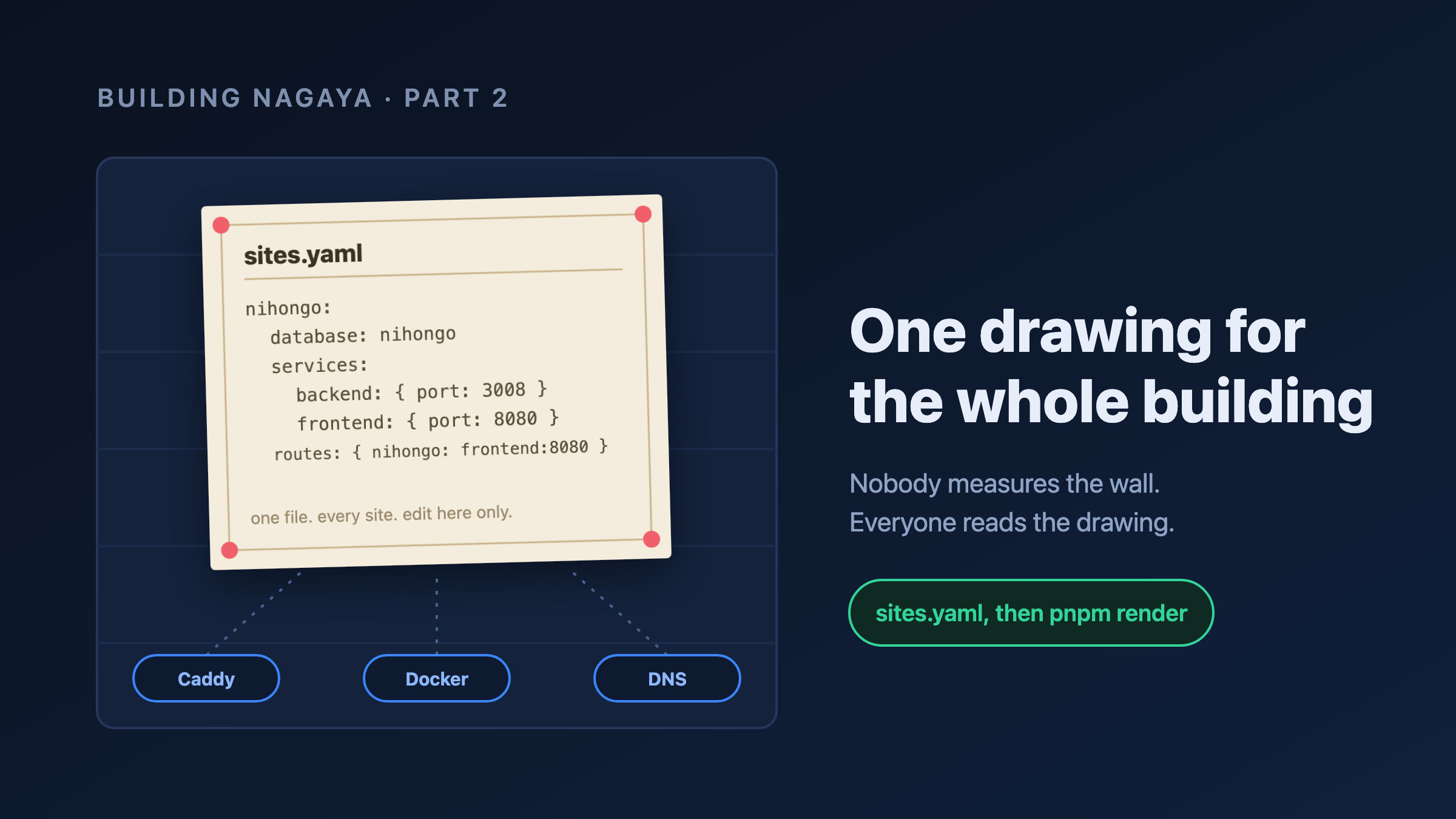
If you walk into any building site you will probably find a site office. Inside it on its wall there is a drawing. It is big, a bit dusty, held up with drawing pins, and it is the most important thing on the whole site.
Everybody reads it. The bricklayer reads it to know where the wall goes. The electrician reads it to know where the sockets go. The plumber reads it to know where the pipes come up through the floor. Nobody walks up to a half-built wall with a tape measure and decides for themselves where the window should be. They go back to the office and read the drawing.
And when the architect changes their mind and moves a door one metre to the left, they don't go round telling each trade separately. They change the drawing. Everyone's work follows from it, because nobody keeps their own private notebook that might disagree.
This article is about the drawing on the wall of my server.
My server is called nagaya (長屋, a row house: many households under one roof). It is one rented computer that runs every one of my sites, the futari.live ones and the ofuma.ai ones. In the opener I explained why I moved everything onto one box. This one is about how the box knows what to run, and the answer is a single file called sites.yaml.
Before the drawing
Before nagaya, my sites lived on three Hetzner boxes (the move there is in my earlier article about leaving DigitalOcean). Each box had its own idea of the world.
On the dmb box, dmb's own Docker Compose file owned the shared pieces: the web server, the Postgres database and the Redis cache. abm and nihongo, my other two futari sites, borrowed them by joining a network I had made by hand, called futari. The ofuma boxes each brought their own web server, their own Postgres and their own Redis. And the DNS for both domains lived in Namecheap's dashboard, typed in by hand.
So the truth about "what runs where" was spread across a web server config on each box, several compose files, a crontab per box and a DNS dashboard. Every one of those was a private notebook. None of them had to agree with the others, and nothing checked that they did.
What the drawing has to describe
Let me name the pieces quickly, because the file only makes sense once you know what it is describing.
A container is a sealed bundle of a program plus everything it needs to run (the right Node version, the right libraries). Docker runs them. My backend is one container, my frontend is another.
Docker Compose is a text file that says "run these containers together".
Caddy is the program at the front door of the box. When a browser asks for
dmb.futari.live, Caddy decides which container should answer and passes the request along. That job has a name, a reverse proxy: it stands in front of the real programs and forwards visitors to them, like a receptionist who knows which office everyone works in.DNS is the internet's address book. It turns
dmb.futari.liveinto the box's address so a browser knows where to knock.A crontab is a timetable of jobs the box runs on a schedule, like the nightly backup.
A firewall decides which connections are allowed in at all.
Every one of those needs to be told about every site. Add a new site and you would normally touch all of them, by hand, and hope you didn't miss one.
One file
On nagaya there is one file that says all of it. Here is nihongo's entry, trimmed a little:
nihongo:
  repo: thedumebi/nihongo.futari
  database: nihongo
  services:
    backend:
      port: 3008
      mem: 384m
      health: /healthcheck
    frontend:
      port: 8080
      mem: 64m
      depends_on: [backend]
  routes: { nihongo: frontend:8080 }
Read it out loud and it is almost English. nihongo comes from that GitHub repo. It has a database called nihongo. It has two containers: a backend listening on port 3008, allowed at most 384 MB of memory, which is healthy when /healthcheck answers; and a frontend on port 8080, capped at 64 MB, which starts after the backend. And the name nihongo (so nihongo.futari.live) goes to the frontend.
The file is organised around four ideas, and once you have them the rest falls into place:
A resource is shared infrastructure, defined once at the top: the Postgres instance, the two Redis instances, a shared folder.
An app is one domain:
futariis futari.live,ofumais ofuma.ai. It gives its sites defaults.A site is one deployable thing under an app: one repo, its containers, and the subdomains that point at them.
A service is one container in a site.
Defined once, referred to by name
The resources sit at the top of the file, each one described exactly once:
resources:
  postgres:
    pg-main:
      version: 18
      shared_buffers: 256MB
      max_connections: 100
      mem: 768m
  redis:
    redis-futari:
      version: 8
      mem: 128m
    redis-ofuma:
      version: 8
      policy: noeviction
      mem: 256m
A site never describes a database server. It just names one. Sharing is simply two sites naming the same resource: dmb and abm both point at pg-main, so both databases live in the same Postgres. Nothing else is needed.
There is one small kindness hiding in here that I am quite pleased with. On the old dmb box, abm had been written to reach the shared database as dmb-postgres and the cache as dmb-redis, because those were dmb's containers. dmb itself just said postgres and redis. Rather than change three apps' settings, the futari app gives its sites both names:
defaults:
  origin: nagaya
  postgres: { use: pg-main, as: [postgres, dmb-postgres] }
  redis:    { use: redis-futari, as: [redis, dmb-redis] }
So on nagaya the same Postgres answers to both names, and no app's env file had to change for the move. The drawing absorbed the old box's habits instead of making everyone learn new ones.
Turning the drawing into instructions
A drawing on the wall is lovely, but Caddy cannot read YAML about my sites, and neither can Docker or Cloudflare. Each of them wants its own format. So there is one command, pnpm render, that reads sites.yaml and writes everything else:
sites.yaml ──pnpm render──▶ generated/caddy/Caddyfile        Caddy: hostnames → containers
                            generated/compose/core.yml        Postgres, Redis, Caddy
                            generated/compose/<project>.yml   one per deployable project
                            generated/crontab                 backups, alert checks, site crons
                            generated/firewall.sh             firewall (Cloudflare-only 443)
                            generated/plan.json               what bin/nagaya reads
                            terraform/generated.auto.tfvars.json   DNS + email for Terraform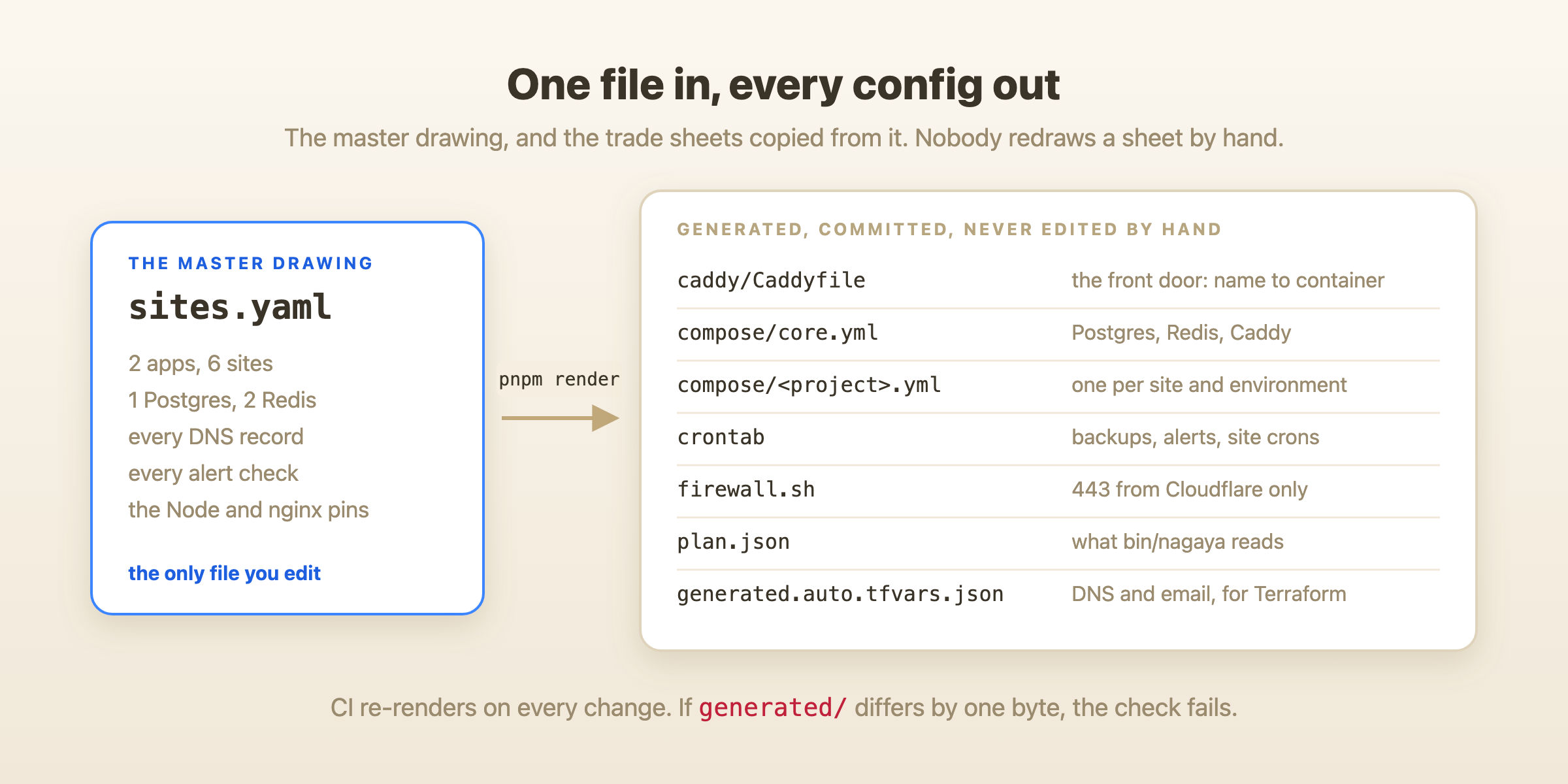
If you've ever seen a building project, these are the trade drawings: the electrical layout, the plumbing layout, each copied from the master drawing for one trade. Nobody redraws the electrical layout by hand. If it is wrong, you fix the master and copy it again.
Here is what the nihongo entry above becomes in the Caddyfile, Caddy's own config:
nihongo.futari.live {
	import tls_futari_live
	encode zstd gzip
	reverse_proxy futari-nihongo-frontend:8080 {
		import proxy_headers
	}
}
And in its compose file, the frontend's image line:
image: ghcr.io/thedumebi/futari-nihongo-frontend:${TAG_FRONTEND:?not deployed yet; run nagaya deploy futari-nihongo <tag>}I never wrote either of those. Every name in them (the container name, the image name, the network) is worked out from the registry by fixed rules, so futari-nihongo-frontend can only ever mean one thing.
Why the output is committed
The renderer is a small TypeScript program, and the generated files are committed to git right next to sites.yaml. Every generated file starts with the same line:
# GENERATED by `pnpm render` from sites.yaml. Do not edit by hand; edit sites.yaml and re-render.That line is a polite request. The real guard is in CI (the automated checks GitHub runs on every change): it runs pnpm render:check, which renders again and fails if generated/ is not exactly what sites.yaml produces. So a hand edit in generated/ is always caught. Somebody quietly fixing the electrical sheet without touching the master drawing is exactly the private notebook we were trying to get rid of.
Committing the output has another benefit I use all the time. When I change one line of sites.yaml, the pull request shows me the YAML change and every config file that change will touch. I don't have to imagine what a change does. I can read it.
(Why build my own renderer rather than install something like Coolify or Dokploy is a question the opener answers. The short version: they bring a dashboard, a database and an agent of their own, and they keep state in that database instead of in git.)
A drawing that refuses to be wrong
This is the part that made the whole thing worth it for me. The shape of sites.yaml is described with zod, a TypeScript library for checking that data has the shape you expect. Every object in the schema is .strict(), which means any key it doesn't recognise is an error. If I type ww: redirect instead of www: redirect, render fails and tells me where. It doesn't silently ignore my typo and leave me wondering why the www address never worked.
Beyond shape, render checks that the drawing makes sense. Among other things, it refuses:
a route to a service that doesn't exist, or on the wrong port;
a hostname routed twice;
a reference to a resource, origin or shared folder that isn't defined;
two containers claiming the same name on one network;
an app with a database but no backup bucket;
an alert check the box has no code for.
The whole point is that mistakes fail at render time, on my laptop or in the pull request, rather than on the box at the moment a site goes live. There are 29 tests on the renderer, and several of them exist because something broke. I'll show you the best one in a minute.
How a change flows
So a change to the building goes like this:
Edit
sites.yamlon a branch.Run
pnpm renderand commit both.Open a pull request. CI runs the tests and the render check, and shows a Terraform plan: exactly which DNS records will be created, changed or deleted.
Merge. CI runs Terraform, which updates DNS at Cloudflare, then SSHes into the box and runs
nagaya apply, which creates networks, starts or stops containers, reloads Caddy and installs the crontab.
Terraform, if you haven't met it, is a tool where you describe what you want to exist (these DNS records, these settings) and it works out the steps to get there. How the domains moved to Cloudflare is a whole story of its own, and it is in The Gatehouse (part 4).
Moving a site is one word
There is one more section of the file I want to show you, because it did a lot of quiet work during the migration:
origins:
  nagaya: { ip: <the box's address>, proxied: true }
An origin is a machine that DNS records can point at. Every site has one (the futari app sets origin: nagaya in its defaults, as you saw above), and that site's DNS records point at that machine's address.
During the migration this list had four entries: nagaya and the three old Hetzner boxes, the Hetzner ones with proxied: false so they kept working exactly as before, with their own certificates. Every site started out pointing at its old Hetzner box. Moving nihongo was adding one line to its entry:
nihongo:
  repo: thedumebi/nihongo.futari
  origin: nagaya            # ← add
The Terraform plan for that change was exactly one record, updated in place: nihongo's address changed from the old box to nagaya, and proxied went from false to true. Because records are keyed by their name, Terraform edits the existing record instead of deleting one and creating another, so there is never a moment with no record, or with two.
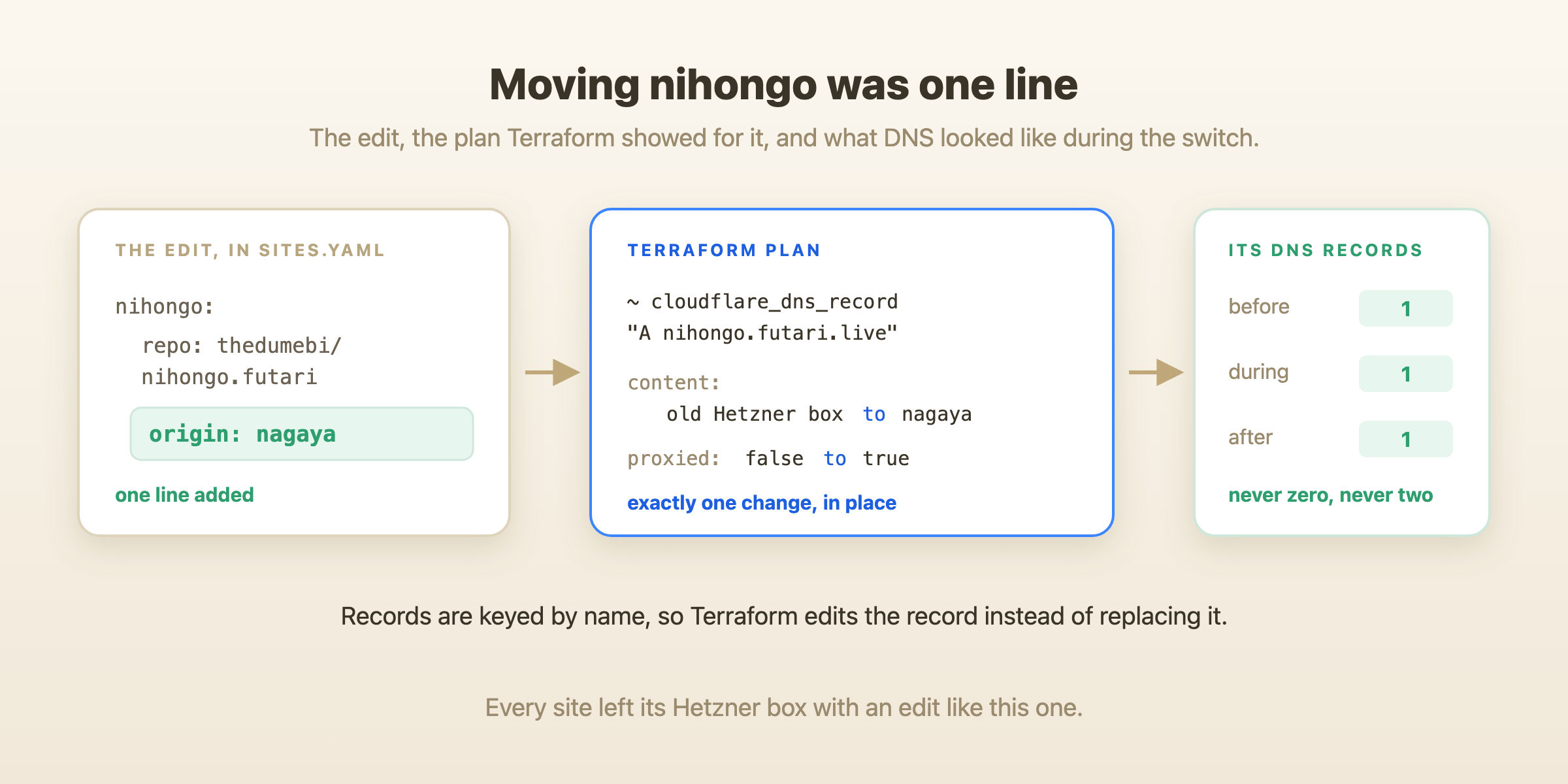
Moving a site between machines really is changing one word. How I used that to move live sites one at a time is in One Lever at a Time (part 6). Once the last site had moved, the Hetzner origins came out of the file.
The night every backend answered to "backend"
Docker lets containers talk to each other over networks. Think of a network as a private corridor: containers on the same corridor can knock on each other's doors, and containers on different corridors can't see each other at all. On a corridor, Docker also puts a nameplate on each door. A service called backend in a compose file can be reached on its network simply as backend.
My first design gave each site its own private corridor (futari-dmb, ofuma-main and so on) for its own containers. But Caddy needed to reach every site that had a public address. So every container Caddy routed to also joined one shared corridor called edge, where Caddy lived.
Here is the catch:
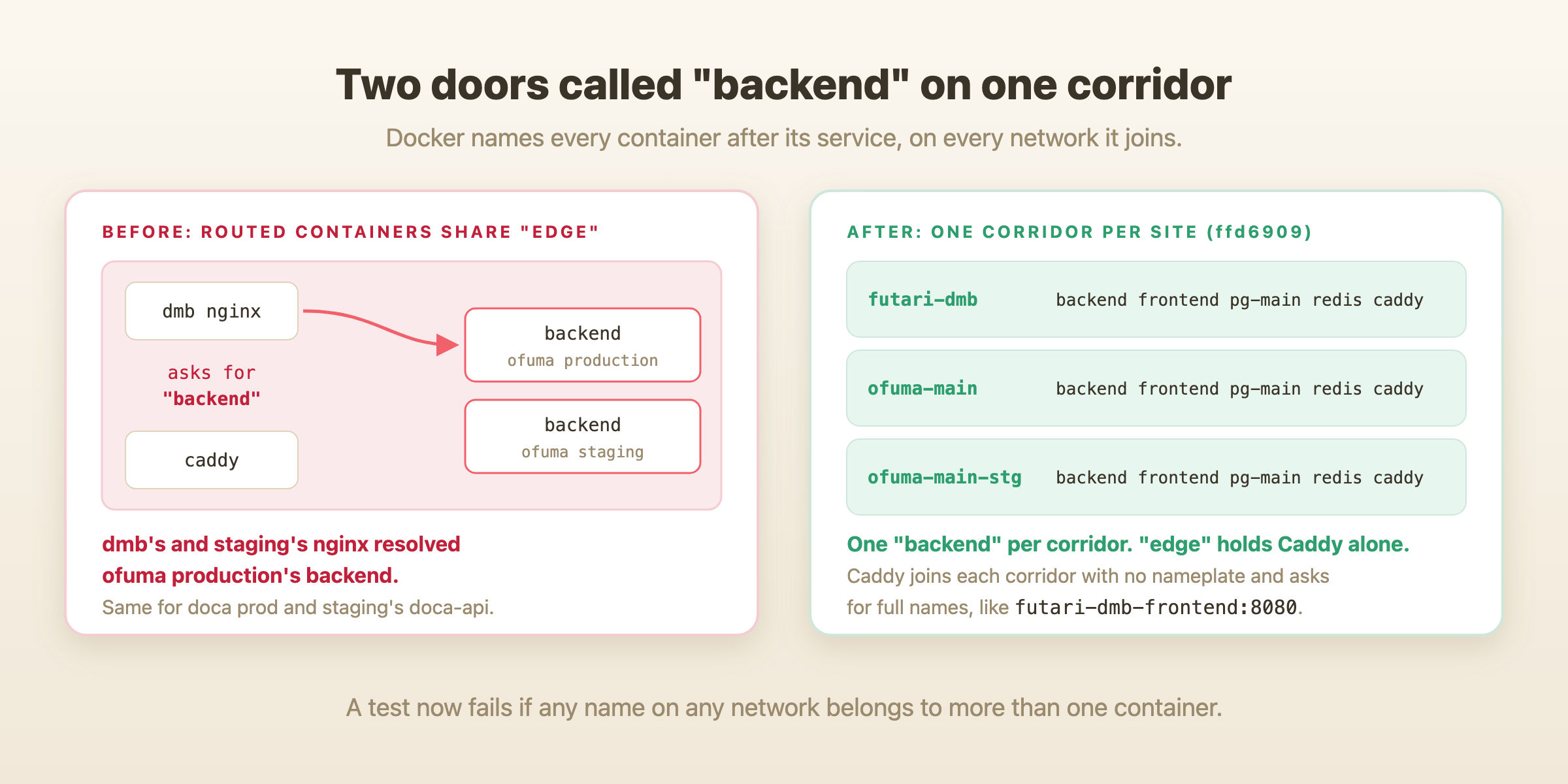
Every routed container joined the shared edge network, and Docker gives each container its service name as a DNS name on every network it joins. So on edge every project's
backendanswered tobackend: dmb's and staging's nginx resolved ofuma production's backend, and doca prod and staging each resolved the other's doca-api.
Picture a shared corridor where two different flats both have "Flat B" on the door. A courier walks in with a parcel for Flat B. Which door does he knock on? Whichever one he finds first. dmb's frontend asked for backend and could be handed ofuma's. Staging's frontend could be handed production's. 😬
The fix is the shared corridor now holds Caddy alone. Instead of every site joining Caddy's corridor, Caddy joins each site's corridor, with no nameplate of its own. And it never asks for anyone by their short name. It asks for the full container name, futari-nihongo-frontend:8080, which is unique on the whole box. So backend can mean a different container on every corridor, and that is fine, because on each corridor there is exactly one.
A test pins it: no project's compose file may mention edge, Caddy must be attached to exactly the projects that have a route, and within any one network every name belongs to exactly one container. On top of that, render refuses two containers claiming the same name on one network. The building can't be drawn that way any more.
Plugged in from outside
Postgres and Redis reach each site's corridor in a slightly unusual way too, and it is worth a short paragraph because it looks wrong until you know why.
You might expect the core compose file (the one that runs Postgres, Redis and Caddy) to list every site's network. It doesn't. If it did, adding a new site would change that file, and Compose would respond by recreating the Postgres container to connect it to the new network, briefly dropping every other site's database connections. Adding a tenant would knock on every other tenant's door.
So nagaya apply attaches them from outside Compose, with docker network connect --alias, giving each one the names that site's code expects (postgres, dmb-postgres and so on). A new network gets plugged in and nothing already running is touched. It is re-run on every apply, because recreating a core container (for an image update, say) drops those connections.
What stays off the drawing
One last thing the drawing deliberately does not hold: how each app is set up. There are no database passwords in sites.yaml, no API keys, no app settings. nagaya passes exactly one value into a container, NODE_ENV, which is production or staging. Everything else an app needs comes from its own repo, inside its own image.
The drawing says which rooms exist and which doors open onto which corridor. What furniture goes in each room is the tenant's business. Even the database role and password come from the app's own encrypted env file, read at deploy time, so rotating a password is a normal app deploy and nagaya never keeps its own copy. How those images get built, carried to the box and started is the next part, Cut at the Quarry (part 3).
Adding a room
Which brings us back to the site office. When I want a new site, say blog.futari.live, I add one block under the futari app, copied from a site shaped like it, and run pnpm render. The pull request shows the new compose file, the new Caddy block and one new DNS record. When I merge, Terraform creates the record, nagaya apply creates the network and plugs Postgres and Redis into it, and Caddy picks up the new route. The site is live once its own repo deploys for the first time; until then the address answers with a 502 and nagaya apply reports it as "not deployed yet".
One block in one file, and every trade on the site knows about it. I hope this was helpful 🙂.
Who serve unto the example and shadow of heavenly things, as Moses was admonished of God when he was about to make the tabernacle: for, See, saith he, that thou make all things according to the pattern shewed to thee in the mount. - Hebrews 8:5